

*Cube-Host– full cloud services!!
: Function WP_Styles::add was called incorrectly. The style with the handle "hello-elementor-child-style" was enqueued with dependencies that are not registered: hello-elementor-theme-style. Please see Debugging in WordPress for more information. (This message was added in version 6.9.1.) in /home/csrkub/domains/cube-vps.com/public_html/wp-includes/functions.php on line 6131
Notice: Function WP_Scripts::add was called incorrectly. The script with the handle "gpress-custom-js" was enqueued with dependencies that are not registered: gpress-siema. Please see Debugging in WordPress for more information. (This message was added in version 6.9.1.) in /home/csrkub/domains/cube-vps.com/public_html/wp-includes/functions.php on line 6131
*Cube-Host– full cloud services!!

1. Open the “Run” window (Win+R) and run SystemPropertiesRemote:

2. On the Remote tab, select Allow remote connections to this computer and (recommended) Allow connections only from computers running Remote Desktop with NLA:

3. In newer builds, you can enable the same thing via Settings → System → Remote Desktop → Enable:
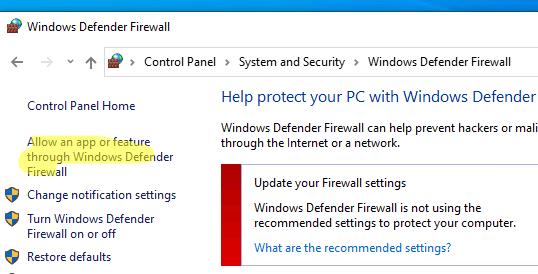
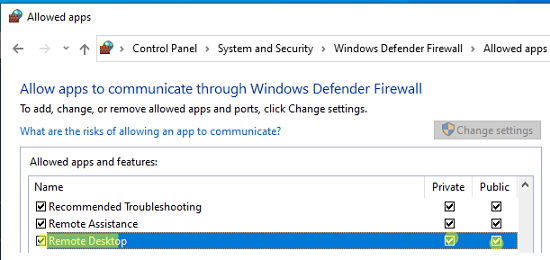
4. Make sure that Windows Defender Firewall allows RDP (TCP 3389; newer versions also use UDP 3389). Open Allow an app or feature through Windows Defender Firewall → check the Remote Desktop rule:
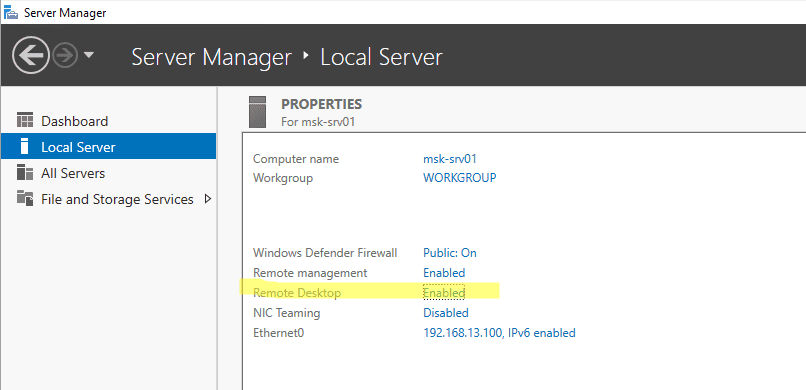
In Windows Server, the same can be enabled via Server Manager → Local Server → Remote Desktop = Enabled.
Windows (mstsc)
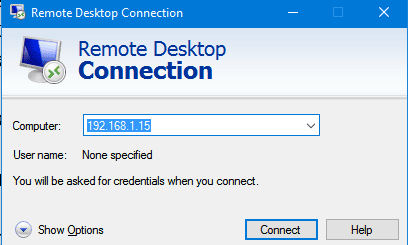
Press Win+R → mstsc, enter the server IP address in the Computer field, and click Connect.
Use Show Options to enable the shared clipboard and, if necessary, redirect drives/printers.
Install the free Microsoft Remote Desktop client from the App Store → Add PC → enter IP/login/password → connect. The client supports scaling, shared clipboard, and full-screen mode.
Graphically convenient Remmina. In the terminal, use FreeRDP:
xfreerdp /u:Administrator /p:'YourPassword' /v:203.0.113.10 /dynamic-resolution /clipboard
1. Is port 3389 available?
Check on the client:
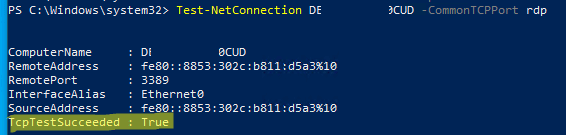
Test-NetConnection 203.0.113.10 -CommonTCPPort RDP
TcpTestSucceeded : True means that the port is listening and can be reached.
2. NLA/accounting.
If you see an authentication failure, temporarily disable NLA for testing (re-enable it after testing) and make sure that the user is a member of the Remote Desktop Users group.
3. Firewall/ACL.
Check that your local firewall and external ACLs at your Windows VPS provider allow 3389 traffic from your network.
4. UDP “black screen.”
In new builds, RDP also uses UDP 3389; if you’re having network issues, it sometimes helps to temporarily disable UDP transport (on the client/network). Details and use cases are provided in the source code.
					#On the server as an administrator:
Set-ItemProperty -Path 'HKLM:SystemCurrentControlSetControlTerminal Server' `
  -Name 'fDenyTSConnections' -Value 0
Enable-NetFirewallRule -DisplayGroup 'Remote Desktop'

